


Digital accessibility requires more than technical solutions because it functions as a fundamental business approach. Accessibility testing services create entry points for users who typically face exclusion from digital platforms.
The implementation of these services leads to better usability and trust while creating long-term value and minimizing digital risk. This blog provides a framework to establish accessibility testing services as a fundamental element for product success.

What makes accessibility important for digital products
Accessibility goes beyond design choices because it serves as a strategic tool. Digital products that achieve accessibility become essential entry points to reach the 1.3 billion people who are differently abled globally. Every application user must be able to utilize your services and products without restrictions of any kind. Applications without accessibility features block both potential users and profit opportunities.
Legal requirements meet ethical standards while promoting user experience
Digital accessibility remains a legal requirement in various countries, although compliance represents only the beginning of its importance. Actual-world customer loyalty stems from both ethical duties and user experience principles. The adverse outcomes of lawsuits, damaging press reports, and damage to reputation can be prevented through proper measures. Designing with purpose while showing respect to all users generates trust. The implementation of accessibility testing services creates the necessary connection.
An Overview of WCAG 2.2 Requirements and Testing Services
WCAG 2.2 serves as the worldwide benchmark for web accessibility standards. The implementation of WCAG criteria requires systematic testing through automated and manual approaches. Accessibility testing services verify product conformity and detect usability problems while ensuring digital products deliver inclusive experiences during platform evolution.
The Initial Step Involves Implementing Accessibility Testing Services
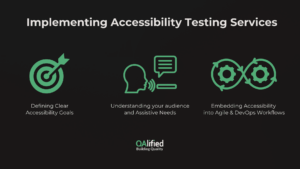
Defining Clear Accessibility Goals
Strategic accessibility requires organizations to establish specific accessibility goals.
Strategic accessibility starts by establishing clear objectives. Establish quantifiable targets, such as decreasing support requests from disabled users or boosting accessible feature usage. Business KPIs and user requirements must guide product decisions by developing specific goals.
Understanding Your Audience and Assistive Needs
Organizations need to understand their audience because service to the unfamiliar remains impossible. The company must understand which assistive technologies their users depend on, including screen readers, voice input, and alternative navigation methods.
Create user personas that incorporate people with disabilities among their numbers. Let real users validate your assumptions. Accessibility testing must be ongoing rather than occasional throughout Agile and DevOps operational workflows.
Embedding Accessibility into Agile and DevOps Workflows
Include accessibility testing services as part of each sprint. Basic checks should be automated within the CI/CD pipeline. The definition of done should include accessibility as one of its criteria. The quality process moves to the left, which detects problems early and minimizes future work.
Focus Areas for Accessibility Testing
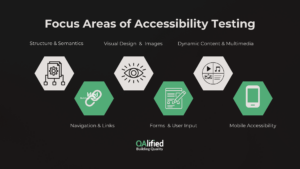
The following six checklist areas represent the practical foundation of accessibility testing services. These areas represent actual problems we have observed in both enterprise platforms and public systems. This section serves as a strategic guide for building inclusive digital experiences that are both resilient and future-proof as well as bug detection.
Checklist Area 1: Structure and Semantics
- Use of Semantic HTML
Semantic HTML demands the correct use of HTML elements. Using correct HTML elements, including <nav> together with <article> and <button>, serves more than visual purposes. Screen readers, along with assistive technology tools, understand these structural elements. Semantic HTML enables structure and usability to maintain consistency from one experience to another.
- Proper Heading Hierarchy
A proper heading structure using H1 and H6 enables screen reader users to navigate through content. Screen reader users rely on correct heading levels to navigate through content. They commonly use headings as their primary navigation method. Unlogical structure prevents users from maintaining context and leads to disorientation. The audit process should include tests for this requirement.
- Language Declarations and Document Structure
The HTML language specification should be indicated by \<html lang=”>. Inline content requires documentation of changes. Without these elements, screen readers will incorrectly read or misinterpret the content. Accessibility testing services detect minor details that developers commonly miss during verification processes.
Checklist Area 2: Navigation and Links
- Keyboard Navigability
All interactive components, including links, buttons, and modals, must function through keyboard-only interactions. The requirement goes beyond screen reader functionality. Users with motor disabilities and voice input technology benefit from this feature. Tests should cover the tab, arrow keys, and escape functions.
- Focus Order and Skip Links
The correct sequence of focus points enables users to move through the interface easily. Through skipping links, users can jump past headers and directly reach content. The improper sequence of tab keys produces an unorganized user experience. The testing services verify that user behaviour matches the expected system flows during evaluations.
- Descriptive and Unique Link Text
Links need descriptive text and distinct names to avoid confusion. “Click here” fails accessibility. All links must include specific information about their destinations and actions. The accessibility of screen reader users depends on link text uniqueness because repeated link names will create user confusion. Usage of testing tools and manual checks is critical.
Checklist Area 3: Visual Design and Images
- Color Contrast and Font Scalability
Sufficient color contrast helps users with vision deficits or color perception disabilities read text properly. Users need to be able to increase text size by up to 200% without encountering any issues with content or functionality. The accessibility testing includes both contrast analysis and zoom validation tests.
- Alternative text for all Image Types
All informative images require alt text. This allows blind users to make sense of information. Decorative images should be marked null (alt=””). Complex infographics may need long descriptions or ARIA labels.
- Minimizing the Use of Images Containing Text
It is recommended that you use the text in real words only. It is also important to note that image text does not adjust well, and screen readers cannot read it. Logos and branding may be represented through images; in such cases, ensure the image descriptions are clear in the alt text.
Checklist Area 4: Forms and User Input
- Properly Labeled Input Fields
Each input field requires an accompanying visible label for users to understand its purpose. Focus events trigger the disappearance of placeholders which serve as alternatives to labels. The “for” attribute and ARIA labeling methods enable proper programmatic connection between labels and their corresponding input fields.
- Clear Error Messages and Validation
Validation messages should appear inline and be communicated clearly. Users should receive specific error messages instead of the ambiguous “Invalid input.” Identify the mistake along with instructions on how to resolve it. Testing with screen readers verifies that alerts receive proper announcements to users.
- Keyboard Accessibility for Form Controls
All form controls, including radio buttons, dropdowns, and checkboxes, need to be accessible through keyboard input. Manual testing is essential because automation tools tend to miss faulty interactions.
Checklist Area 5: Dynamic Content and Multimedia
- Captions and Transcripts for Video/Audio
Implementing captions serves as an accessibility feature that helps deaf and hard-of-hearing viewers. Transcripts offer a fallback. Closed captions should be used instead of burned-in text, and users need to validate the accuracy and timing of these captions.
- Animation and Motion Controls
Different animations present the potential to induce dizziness and seizures in users. Provide users with an option to deactivate motion effects. Avoid autoplay. Accessibility testing examines default states and upholds user OS preferences regarding accessibility settings.
- ARIA Roles and Live Region Usage
The Live regions notification system announces fresh content updates that include chat messages and alerts. Test your screen reader announcements while carefully implementing these elements to achieve clear and non-intrusive results.
Checklist Area 6: Mobile Accessibility
- Touch Target Size and Spacing
The recommended minimum size for buttons should be 44×44 pixels with a proper distance between them. Users with limited dexterity cannot utilize touch targets that are either too small or crowded.
- Responsive and Adaptive Content
Interfaces require testing in different orientations and multiple screen sizes. Users should be able to read all text without truncation, and all controls must remain visible without overlapping. WCAG 2.2 requires reflow and zoom resilience.
- Mobile Screen Reader Compatibility
Mobile users should utilize Talkback (Android) and Voiceover (iOS) screen readers during accessibility tests. They need to verify that the application supports gestures, demonstrates correct focus points, and makes proper label announcements.
Tools Supporting Accessibility Testing Services
Use tools like Axe for fast issue detection and NVDA, JAWS, and VoiceOver for manual validation. Emulators simulate various disabilities. Automated tools catch 30–40% of issues. Manual testing finds the rest, especially around keyboard flow, focus traps, and screen reader experience. Combine both.
Make sure to integrate accessibility scans into your CI pipeline. Break builds for critical violations. Set quality gates. This ensures that you identify regressions before you release the product.
Team Roles in Accessibility Testing
Accessibility is a shared responsibility. Designers must plan for contrast and labels. Developers must code it right. Testers must validate experience across personas. Every team needs advocates. Accessibility champions drive awareness, conduct reviews, and help guide decision-making.
It is essential to train PMs, executives, and marketers. Host empathy sessions. Include differently abled people in testability. Make it cultural, not just technical.
Sustaining Accessibility Testing Services Long-Term
Accessibility isn’t one-and-done. Retest after each release. Check new features. Validate fixes. Document findings. Track trends. Use dashboards to track accessibility KPIs: issues found, fixed, reopened. Highlight high-risk areas.
Make accessibility visible to leadership. Regular audits should be scheduled at least once every quarter or every other year. They enable you to enhance your practices, train your team better, and adjust your tools. Working with an Accessibility Testing Company can also help teams validate compliance, identify barriers that internal reviews may overlook, and keep accessibility standards aligned with each product release.
Conclusion: The Strategic Value of Accessibility Testing
Brands that demonstrate inclusion achieve superior results in terms of customer trust, loyalty, and expanded reach. Organizations that focus on accessibility create market opportunities that other companies cannot access.
The checklist serves as more than a simple collection of tasks. It functions as an adaptable business-scale blueprint that enables inclusive design solutions for your organization.
Accessibility testing services are not a cost center. They’re a capability, a mindset, and a lever for leadership. The checklist provides a clear route to developing unforgettable products that are accessible to everyone.
When Ceibal, Uruguay’s national education platform, needed to make its digital systems more accessible, it hired QAlified to audit and improve accessibility across its entire platform, ensuring inclusive learning for all students.
📩 Ready to build accessible digital experiences that scale?
At QAlified, we help organizations like yours turn accessibility goals into real-world outcomes—through expert audits, compliance support, and sustainable design practices.
👉 Talk to our accessibility experts
References:
1. Differently Abled People Statistics: https://www.who.int/news-room/fact-sheets/detail/disability-and-health
2. WCAG 2.2 Standards: https://www.w3.org/TR/WCAG22/
SHARE:

