


The size, shape, and position of different design elements, like pictures, pages, or other visual components on the screen, must be accurate for the layout to be considered right. In addition, elements must be distinct from each other and should not overlap.
Validating appearance requires that the visual elements' font, color, brightness, contrast, density, texture, visual weight, graphics, etc., look appropriate.

Checking if the user finds the visual elements of the application’s user interface properly is known as visual regression testing or visual testing in software. Visual Validation Testing is also used for visual regression testing.
When discussing VRT, it’s crucial to consider how the software was developed in the past because, without a reliable baseline, no amount of testing would be useful.
What is Visual Regression Testing?
Regression testing ensures that any software update does not damage anything that has been working properly.
When it comes to visual testing, visual regression testing ensures that any style problems don’t surface when any modifications are made to the product. The application should maintain its previous level of aesthetic quality.
Using screenshots of the current user interface, a visual regression testing tool compares them to the baseline. Therefore, visual regression testing examines past variances. It verifies that the web page continues to render as expected in various browsers despite code changes.
How Visual Regression Testing Works?
Visual regression testing tools simply check that each UI element is displayed in the proper color, size, or location and that no components overlap or are hidden. It guarantees that your program will function flawlessly, even after several software upgrades.
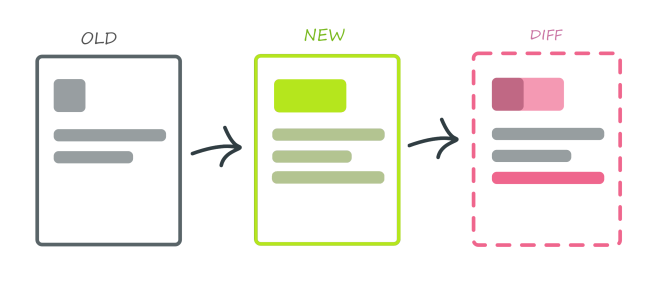
Doing this takes two screenshots of your web application: one as a baseline image before modifications are made and one after a change is made to the code. The test is successful if the screenshot comparison shows no unexpected inconsistencies and the new state of your program is the same as your old reference picture.
Why is regression testing important?
No matter how well your program functions, it will only be useful to the user if it can deliver a positive user interface and experience to the user.
Nowadays, both user interface (UI) and user experience (UX) are crucial. Therefore, visual testing becomes crucial to create a better user experience since a user may perceive a visually beautiful design as more useful.

The user experience is shaped in several ways by visual design. For Example:
- Excellent visual designs contribute to credibility and trust-building.
- Enhances the brand’s image.
- A factor in readability
- Creates a sense of harmony on the screen.
- Directs users to take action.
- Convinces the eye to direct its focus to specific page components.
Additionally, a wide range of operating systems, web browsers, screen resolutions, and devices are available nowadays, so it is essential to ensure the user interface (UI) looks perfect across all possible configurations.
A loss of revenue can arise from even a little UI distortion. For example, users may see visual glitches that are upsetting and unpleasant, causing them trouble.
For Instance
Consider that you own a bank and provide your clients with a mobile banking app for use online.
Some of your customers have complained that after providing all the necessary information for a money transfer, they cannot locate the “Submit” button on the page, which is a frustrating experience for them.
When you look into the problem, you discover that on a specific android mobile screen resolution, the submit button disappears. Because of this, all users of Android phones with that specific screen size were unable to view the submit button.
Therefore, even if the application functionality was flawless in this instance, customers could not finish using it due to a visual problem. This illustration demonstrates how crucial it is to thoroughly test the application’s visual components across all feasible setups before making it available to users.
Because it will have an immediate effect on your brand, the following are some areas where visual validation testing is strongly advised:
- Mobile Apps
- Mobile Web/Responsive Web
- Marketing websites
- Content management systems
- Consumer systems like airlines, travel, banking, etc.
Given its significance, businesses should invest a lot of time and resources in visual testing. By combining them with the developer tests already in place, you can find visual problems early in the development lifecycle.
Visual Regression Testing Tools
The essential features of each tool are given below, but if you need to know which ones are the best, here is a fast rundown.

- Katalon Studio
- Kobiton
- Playwright
- Percy (BrowserStack)
- LambdaTest
- CrossBrowserTesting (SMARTBEAR)
- Applitools
Katalon Studio

Katalon Studio is an end-to-end automation solution that supports functional and regression testing by turning complex processes into simple tasks for testers.
Regression testing software for your website, online services, and mobile application is available from Katalon Studio. Katalon Studio also allows scripts to run on various platforms, browsers, and devices.
With the thorough and editable test reports in LOG, HTML, CSV, and PDF formats, you can study test findings in-depth and send them as email attachments.
Kobiton
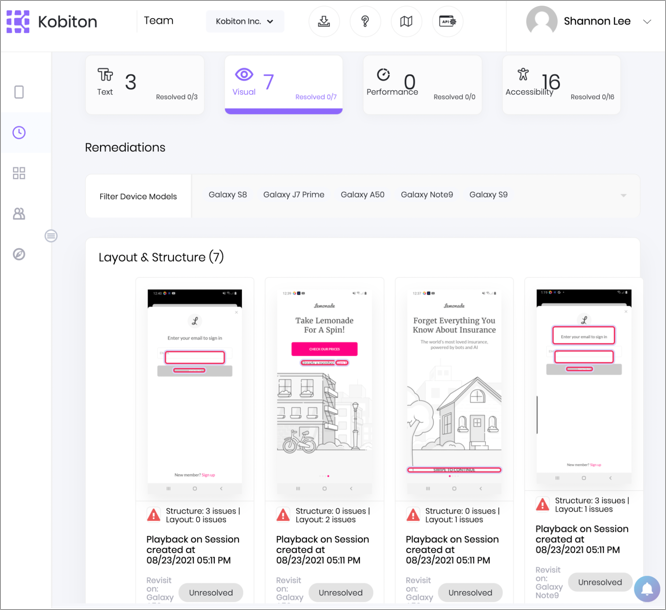
Team testing for mobile devices is best. The complete mobile Visual Validation and Visual UX Testing solution are provided by Kobiton’s scriptless automated visual regression testing solution.
Kobiton, a mobile testing platform, provides the complete mobile Visual Validation and Visual UX Testing solution.
It is designed to discover visual defects to improve mobile UI and UX. It detects flaws in appearance and functionality that would not have been seen otherwise.
It delivers real-world, cloud-based, or even on-premise human and automated testing for mobile apps.
When you utilize Kobiton, you get immediate access to your private cloud or local lab and more than 350 genuine devices.
Playwright
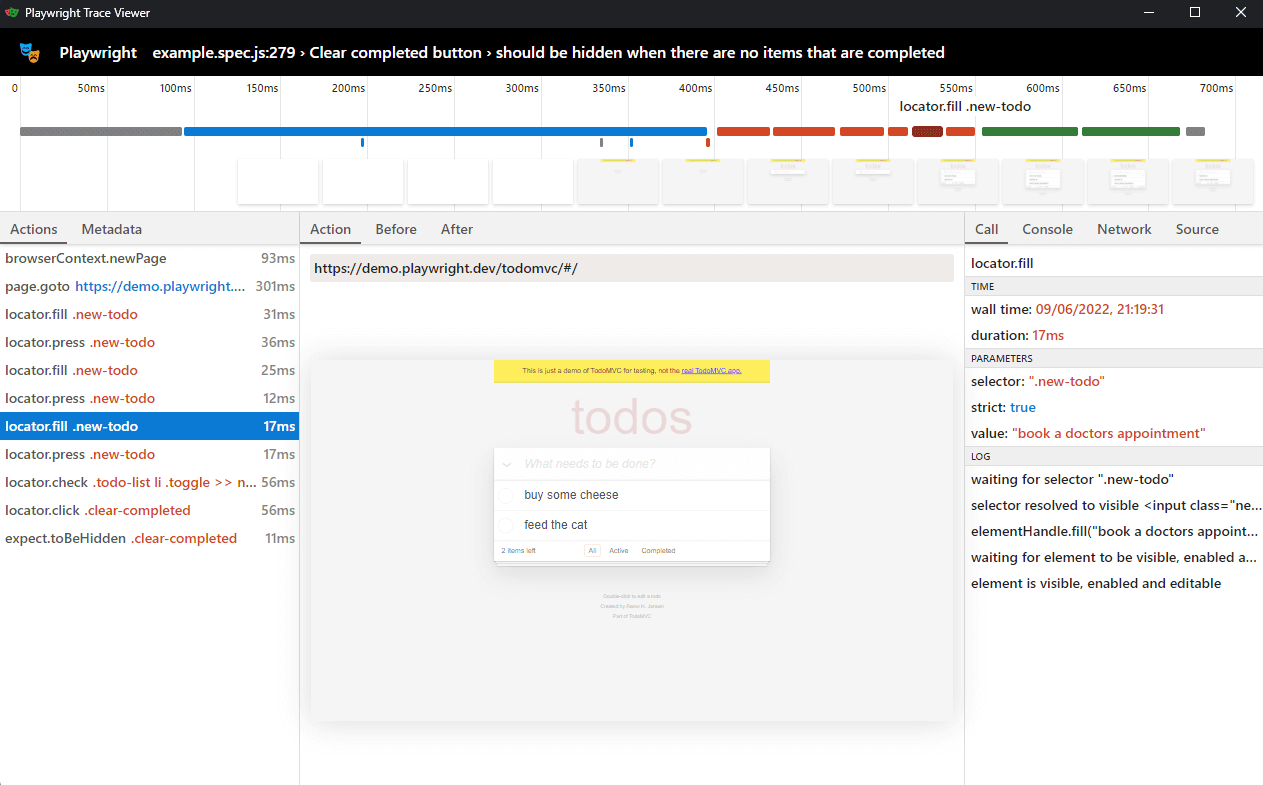
Playwright is a Microsoft-developed NodeJS library with many of the same functionality as Puppeteer. You can automate browser operations using either library.
You may launch or connect to a Chrome, Edge, Safari, or Firefox browser using Playwright and communicate by sending and receiving commands. These messages are sent via a special protocol for Firefox and WebKit browsers and the DevTools protocol for Chromium browsers. The fact that Playwright supports a variety of browser manufacturers is its key benefit.
With the aid of these test frameworks, you can launch or connect to a browser and carry out the tasks listed in your test cases.
Playwright will, by default, operate headless, so bear that in mind. This implies that the user won’t be able to see the browser’s user interface. You won’t observe the browser taking these steps while your automated tests are running. Playwright execution is sped up using headless mode, which lowers CPU utilization because no UI updates are needed and increase execution performance overall.
Percy (BrowserStack)
One of the practical tools for automated visual regression testing is Percy. You may integrate, run, and evaluate the visual tests using it. You can integrate directly through your application, CI/CD services, or test automation frameworks.
Following integration, we can run the necessary visual tests on the apps and components. When a visual test is launched, the Percy tool gathers user interface screenshots from multiple browsers and responsive widths. Then, it compares your UI’s baseline pixels to look for pertinent visual changes.
You can check the produced screenshots for any visual problems after that.
The dynamic diffs and pixel-by-pixel comparisons offered by this tool provide excellent visual coverage. Additionally, the option for snapshot stabilization reduces false positives.
This is a purchased item. However, a free trial version is available. The three varieties of paid versions are Essential, Business, and Enterprise. The monthly cost is $29, the Business version is $849, and the Enterprise is customized to your needs; hence, the monthly cost will vary.
LambdaTest

Favorable for image-to-image comparison. With the help of LambdaTest’s Smart Visual Testing function, teams may test and contrast two picture layouts to identify their discrepancies. By providing screenshots (the baseline picture and the comparison image) and running the test, you may quickly detect minor visual flaws using Lambdatest’s clever image-to-image comparison technology.
CrossBrowserTesting (SMARTBEAR)
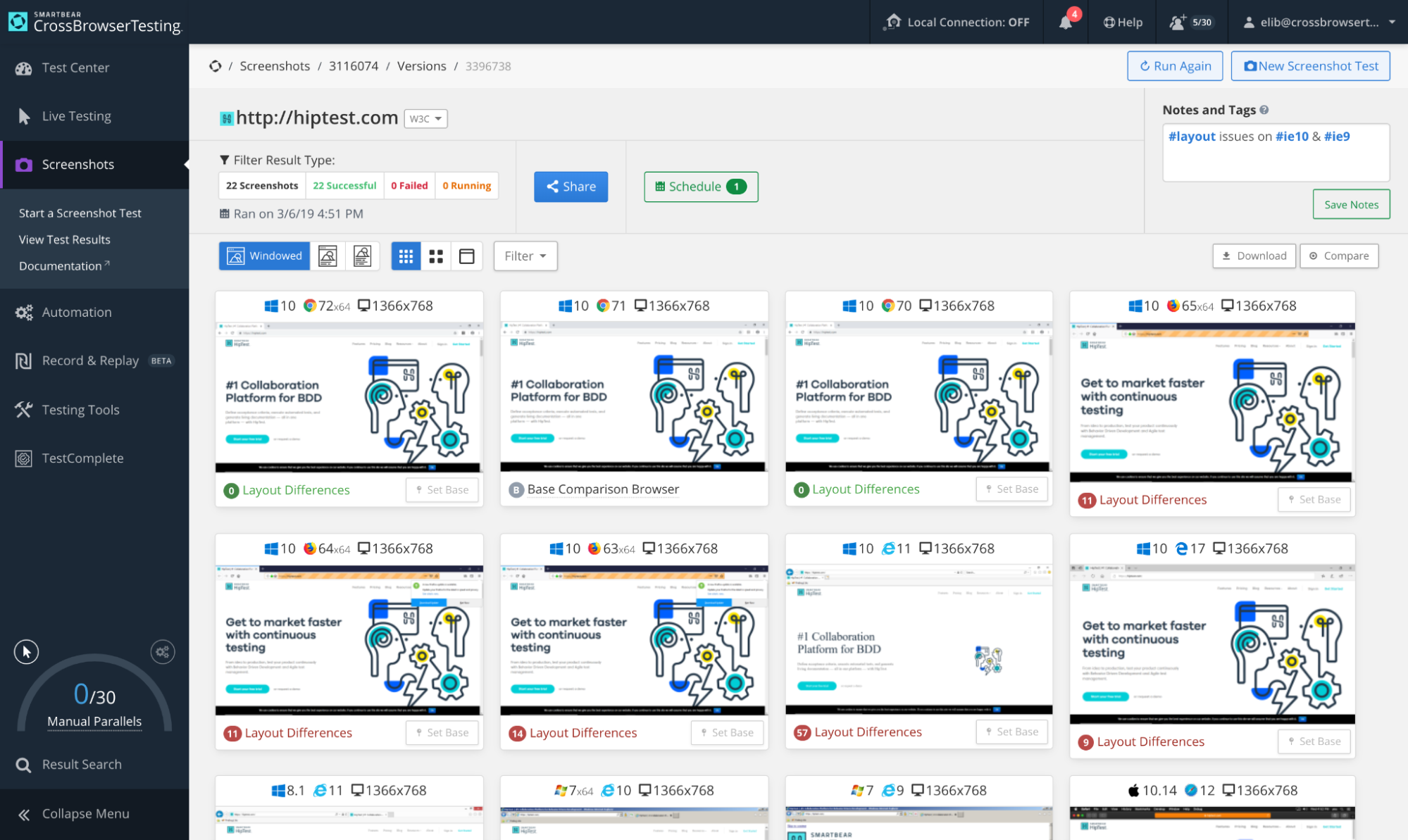
SmartBear created a web testing platform known as cross-browser testing for the full testing procedure. Visual testing and visual regression testing are both covered by this tool.
This tool’s snapshot testing capability takes full-page screenshots, which makes it quick and easy to trace down visual anomalies and detect issues. Before beginning a snapshot test, you must enter the URL and choose a few browsers.
Most common desktop and mobile devices may be tested using screenshots. You may switch your browser’s resolution for dynamic, responsive testing across desktop browsers and mobile orientations. Your snapshot test will show three configurations: windowed, full-page, and full-page chromeless.
You can quickly filter your test results to reveal any visual problems. Additionally, you may skip through a live test and fix the aesthetic flaws there. Finally, you may test local and development environments through a local connection option offered by this program.
Once a snapshot test for visual regression has been completed, you may schedule it to run daily, weekly, or monthly. The tool will also notify users of the test results.
An automated comparison engine in this program allows it to automatically take screenshots of the same page in numerous settings. From this point, you may choose a reference browser and compare the highlighted layout changes with it.
It also provides some cutting-edge choices to enhance the potency of your exam. For example, basic authentication, Login profile, Selenium script, Screenshot delay, Sending emails, Hiding fixed items, etc., are some of these possibilities.
Applitools

Best for apps that are web-based and desktop-based. “Applitools Eyes” is a Cloud Service for Automated Visual UI Testing of Web, Mobile, and Desktop Applications provided by Applitools.
It verifies the UI’s visual output across various platforms, browsers, screen sizes, and other factors.
Full-page screenshots, page layout matching, cross-browser testing, and many more features are supported.
Selenium IDE, Selenium, Cypress, WebdriverIO, Protractor, and Testcafe are a few of the many popular automated testing frameworks and languages supported.
With this tool, you may quickly build visual test cases to be added to your CI/CD pipeline, which connects with the DevOps process. Additionally, it allows you to design unique graphic reports that are simple to read.
Types of regression testing
Visual regression testing is classified into multiple kinds:

Manual visual testing:
It is carried out manually by developers or designers without any automated technology.
Pixel-by-pixel comparison:
Each new image pixel is compared with its corresponding pixel from the baseline image in this regression testing. The test fails if any differences are discovered.
Layout comparison:
This method uses dimensions other than pixels to compare UI components’ positions and sizes. Therefore, the test will fail if the location or size of an element changes.
Structural comparison:
This technique analyzes the DOM’s (Document Object Model) structure to determine if the HTML syntax has changed. If syntax changes, then the test is invalid.
DOM-based comparison:
Layout and structural comparisons are combined in DOM-based visual regression testing. In this method, the locations and sizes of the UI components are validated after they are structurally compared.
Visual AI comparison:
It also goes by “perceptual diffing” and compares text or two photos using machine learning and artificial intelligence. It can be used with dynamic web applications and doesn’t need a baseline picture.
Most app owners or developers choose manual testing if only one or two pages need to be reviewed for updates. However, automated visual regression testing would be the clincher if you have a sizable online application with dozens or even hundreds of pages.
The final verdict
In this blog, we spoke about how crucial visual regression testing is in the current era. The software program must function properly across various screen sizes, mobile devices, operating systems, screen resolutions, etc.
Visual validation testing is just as crucial as functional testing to provide a positive user experience. In addition to it, visual and functional testing combinations can offer comprehensive test coverage.
A broad range of open-source and paid visual regression testing tools and frameworks are available for testing and evaluating the visual elements of apps or websites. In this article, we covered some of the most effective tools. You can use those tools for manual and automated visual regression testing.
SHARE:

