


Testing is a crucial phase in software development. Proper testing helps identify the problem quite easily at an early stage. This eventually saves time and resources by avoiding costly problems later on.
But how do you plan testing to ensure a quality product? Usually, the test plan serves as an outline for the whole course of testing. This also enables all members of the team to have an overview of what needs to be tested, when the testing should occur, and how test processes are carried out.

A good software test plan ensures that any issues are identified , bugs are reduced, and a quality product is delivered to satisfy the users. This guide will take you through everything required in creating a highly detailed software test plan that will make your project a surefire success. Let’s explore what is a software test plan.
What Is a Software Test Plan?
A software test plan is a strategic document that defines how to ensure a quality assurance for a software product. It covers all essential elements: scope, objectives, timeline, resources, and tasks for the testing phase.
It provides a detailed roadmap of which features will be tested, the sequence for testing, and expected outcomes. This proactive approach helps reveal issues early, saving time and reducing the costs of bugs later in development. By setting expectations upfront, the test plan in software testing minimizes risks and ensures the product meets high standards of overall quality.
Key Objectives of a Software Test Plan
The objectives of a software test plan are as follows:

- Identify the testing approach: Specify the type of the testing to be done. Figure out the important features and functions to be tested. The likelihood of reducing defects in the software increases when an appropriate testing approach is chosen, ensuring that critical components are tested against their specific requirements.
- Structure and organize the testing process: Clearly define the scope of the test: what is to be in scope and out of scope. It must outline clear directions toward the project goals. The sequence of the testing activities should be organized in a logical and structured flow. Appropriate organization will streamline it, hence improving the whole process.
- Risk management: This entails the identification of potential risks and stating appropriate solutions. It also involves strategies for dealing with issues that arise during the testing process.
- Assign responsibilities: Identify who will carry out each test so that all the tasks are clearly allocated. Defined roles decrease confusion and raise team efficiency.
- Test resources: Outline the resources required for testing, including tools such as test environments, hardware, software, and configurations. This ensures testing aligns closely with the conditions in which the software will be used.
- Establish a schedule: Establish clear milestones and deadlines as to when these test processes will be executed. This helps ensure testing activities are performed within the timeline of the project. It will also keep the test team on their toes to make sure everything is tested right on schedule.
- Establish success criteria: Clearly establish what constitutes success, which could be a certain passed number in testing or performance standard. This will ensure that the audience knows what’s considered a successful test.
Components of Software Testing Plan
A well-structured test plan is essential for software quality testing in organizing and executing processes effectively. Below are the components of a good test plan:

- Introduction: It provides an overview of the objectives, scope, and purpose of the proposed test plan. This sets the stage for the document to help the stakeholders understand why this is important and what is to be achieved by the testing team.
- Scope of testing: It enumerates particular features, modules, subsystems, and user interfaces to be tested. This also outlines what is out of the scope, thus clearly stating what will and will not be covered.
- Test Approach: This describes strategies of testing, pinpointing whether they can be manual or automated, and the reasons such methods could be chosen. This helps stakeholders recognize why such an approach is taken and how it links to the goals of the project.
- Types of Testing: Outlines the types of testing, such as functional, integration, and usability testing. It ensures that the tests are suited to the characteristics of the system under test and extends the depth of testing on each feature according to its complexity and importance.
- Tools: This includes all the hardware and software components, including networks and configurations, which are required to create simulated real environmental conditions. This helps ensure that tests can be run consistently and without many problems related to differences in test environments. Details could include operating system and tool information.
- Roles and Responsibilities: Allocates tasks among team members to ensure that all people know what their task responsibilities are. Clear responsibilities avoid confusion of any type, expedite the process, and ensure there is a contact point for solutions.
- Test Schedule: It provides a timeline and major milestones of each phase of testing. It will keep the team on track and track their progress until there is any delay in due time.

- Risk Management: Identifies risks that may take place, stating solutions and contingency plans. This will make sure testing can continue smoothly if some of the identified risks occur, to a minimal level of disruption.
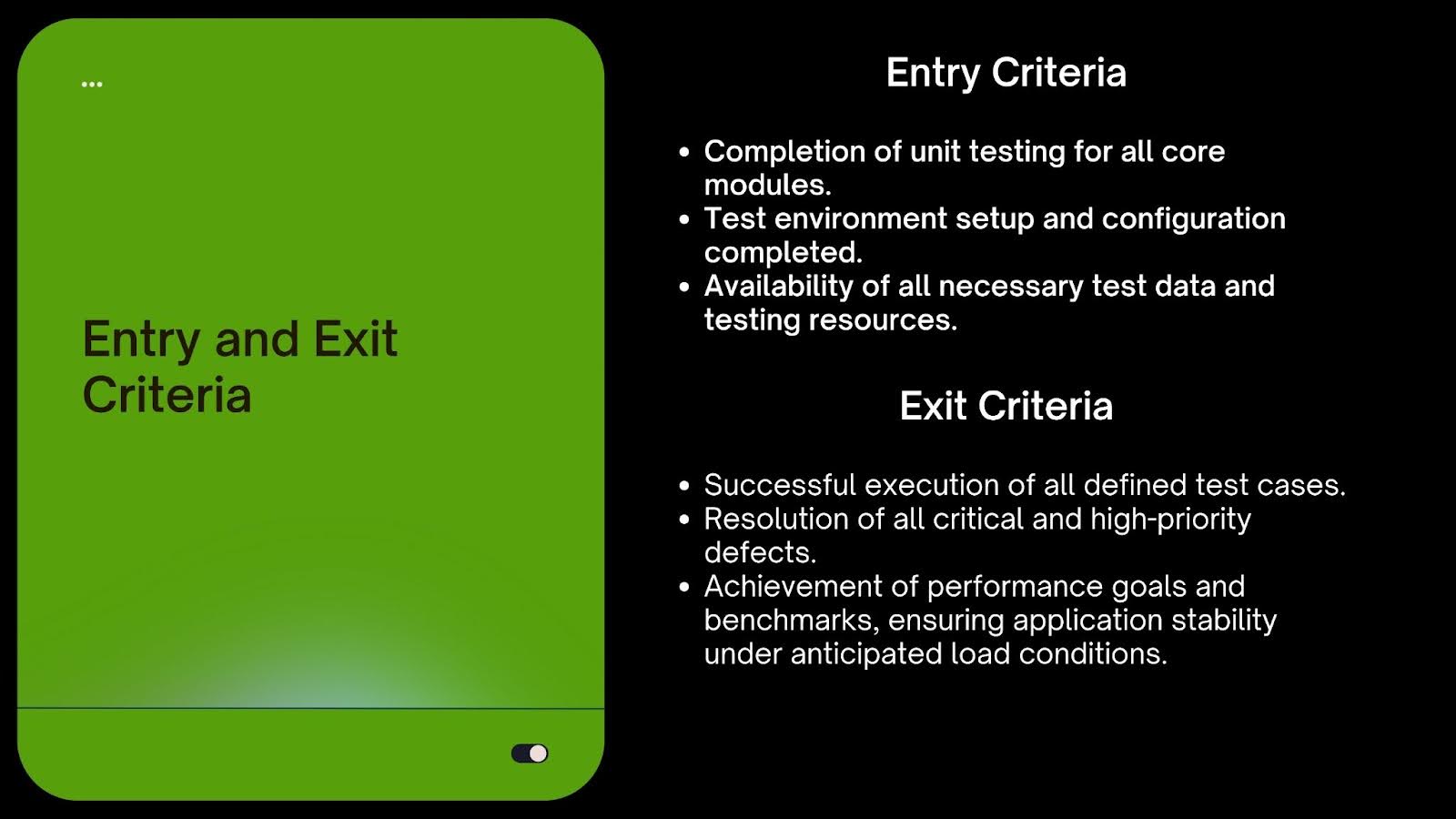
- Entry and Exit Criteria: These are the conditions that determine when testing begins and/or ends. Entry criteria utilize prerequisites to determine the start of testing, whereas exit criteria define quality thresholds that have to be met before proceeding to the next phase.
- Test Deliverables: It documents the test results, defect logs, and summary reports that come out of the test. User guides and insights for stakeholders-cum-customers are also part of deliverables; in fact, proof of quality assurance and valuable information for decision-making.
By incorporating these components, a test plan software testing becomes a kind of cookbook that ensures testing is orderly, efficient, and complete; thus, it will truly assist in ensuring a quality software product.
Step-by-Step Guide to a Software Test Plan
1. Understand the Audience and Product
Identify who will use the product. Try to understand their needs, preferences, and technical abilities. This will make sure that your testing effort aligns with user expectations and will serve your users better.
Secondly, gather as much information as possible about the product needed: features, specification, requirements. Discuss with stakeholders, developers, and product owners to understand the application. This will enable the testers to know how the users will use or interact with the software in order to conduct effective testing.
2. Identify the Scope of Testing
Clearly define what will be and will not be tested. In such a way, everyone in the team will know the focal point. By clearly defining what is out of the scope, you set the boundaries and eliminate a lot of unnecessary confusion among team members.
3. Define Test Objectives
State the major objectives of the testing; for instance, one of the big objectives could be that the software performs the users’ needs without major bugs. In this case, the objectives should be clearly identified to keep testers on track and provide an indicator against which the success of testing is measured.
4. Choose the Testing Type
Select the most applicable form of testing for the project: unit, integration, system, or user-acceptance testing. The approach should fit the particular project methodology, such as continuous testing in agile projects and structured cycles in waterfall models. Ensure that the selected approach to testing will yield all the project requirements in terms of timing and quality.
5. Identify Resources
List and detail all necessary resources required for testing, including testing tools, infrastructure, software, hardware, licenses, and environments. Proper identification and allocation of these resources ensure the testing process is well-supported and efficient.
6. Define Roles and Responsibilities
Clearly define the roles of each team member and assign responsibilities for the various tasks outlined in the test plan. This includes areas such as automation, defect tracking, reporting, and execution. Assigning roles ensures accountability and streamlines collaboration within the team.
7. Setup of Test Environment
Set up an environment for testing that is as close to the real production environment in terms of data hardware, software, and network settings. This reduces drastically the chances of environmental problems while testing the items and promotes easier deployment to production.
8. Risks Identification and Mitigation Strategies
Document probable risks, such as resource delays or technical limitations of any type; also, develop mitigation strategies. Specifically, if one feels that resource availability is a problem, then do cross-training team members with multipurpose roles. Proactive risk management protects against very hairy execution with fewer disruptions.
9. Determine the Entry and Exit Criteria
Clearly identify the unambiguous entry conditions, which initiate the testing, and exit criteria,. Entry conditions ensure that what must be in place preceding any test, while exit criteria ensure significant activities beforehand to the end of testing. This will keep it all in order and ensure stakeholders’ expectations are met.
10. Test Deliverables
Identify all test deliverables, such as test scripts, defect reports, and results of tests. They should be well-documented and understood by any stakeholder. Well-managed deliverables ensure that transparency into testing progress and outcomes is close at hand, thus enabling collaboration.
11. Writing the Test Plan
Combine all the defined components into a single test plan document that is clear, concise, and readable. Include more graphics to enhance readability, such as flowcharts, tables, and diagrams where necessary. This will make the plan engaging and easier to read.
Example of a Software Plan
Software Test Plan: Weather Application
Introduction
The Weather Application provides current weather conditions, forecasts, and warnings to its users in different locations. Users include tourists, commuters or users who require accurate and updated weather information like farmers. Location-based, hour-by-hour/day-by-day forecast functionality, and notice of severe weather will also be available with the application.
Scope of Testing
The following components include the scope of testing for the Weather Application:
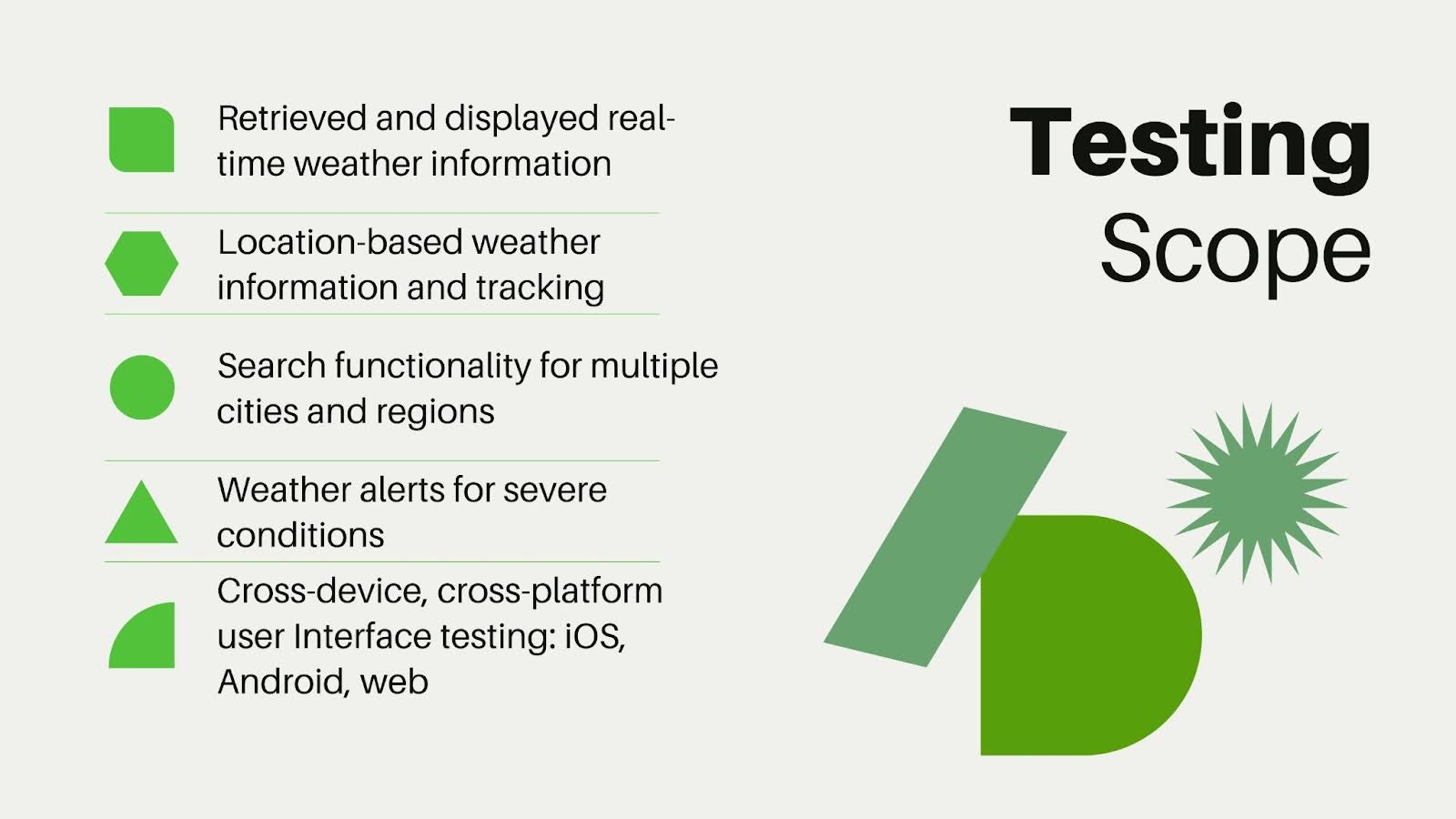
This ensures proper compatibility testing of the application to work on a variety of devices, screen sizes, and browsers. Out-of-scope items will include integrations with third-party weather data services and advanced premium features such as historical weather data and ad-free access.
Objectives and Goals of Testing
The primary goals of testing are:
- Weather data is shown accurately and updated in real time.
- Application is giving a consistent and smooth user experience on a variety of devices and platforms.
- To verify that the weather alerts and notifications are timely and reliable.
- Validate the application handles heavy usage during extreme conditions, especially in cases of high-traffic, adverse weather.
Test Strategy and Approach
- Unit Testing: Each functional component, such as tracking location, obtaining weather information, and performing a search, should be tested separately to ensure that everything works according to the user’s expected behavior.
- Integration Testing: This will be performed by integrating various modules that include retrieving current weather data, alert systems, and location services of the user to make sure the interaction and flow of data is accurate.
- System Testing: Tests will be performed to test the entire application, starting from the search of a location to receiving the weather alerts.
- User Acceptance Testing: The selected number of users will test the app to confirm its functioning with regard to user needs and requirements.
- Performance Testing: It looks into load testing and stress testing to ensure that the application will perform properly under varying conditions, such as sudden spikes in traffic.
Resources and Team Roles
Tools and Technologies: The tools to be used are Postman for API testing, Appium for performance testing in mobile automation, JMeter for performance testing, and BrowserStack for cross-browser compatibility testing.
Team Roles:
- QA Lead: Responsible for overseeing overall testing activities, planning, and ensuring adherence to timelines. Reports progress and prepares deliverable documentation.
- QA Engineers: Develop, maintain, and execute test cases for various modules and features. They report and follow up on incidents.
- Automation Engineers: Design and execute automated scripts for functional and regression testing.
- Performance Tester: Design and perform load and performance tests to evaluate application stability under high usage scenarios.
Test Environment Setup
The test environment will closely replicate the production environment using real devices, emulators, and simulators to test different operating systems (iOS, Android), screen sizes, and network configurations. This setup ensures that bugs or issues identified during testing are consistently reproducible and can be effectively addressed.
Risk Assessment and Mitigation Plans
- Weather Data Inconsistency: If the external weather API fails or provides inconsistent data, mock data will be used to continue testing.
- Network Issues: Testing will be conducted over unstable networks to identify performance bottlenecks and ensure fallback mechanisms effectively handle network failures.
- High Traffic Load: During peak usage, such as natural disasters or extreme weather events, the system may experience heavy traffic. To mitigate risks, infrastructure scalability will be assessed through load testing.
Deliverables and Documentation of Test
The following test deliverables will be produced:
- Test Plan Document: Describes the testing approach, objectives, resources, scope and schedule.
- Test Cases and Scripts: Detailed descriptions of individual tests to be executed.
- Defect Reports: Records of defects or issues identified during testing, categorized by severity and resolution status.
- Test Summary Report: High-level report summarizing testing activities, coverage, and outcomes.
- UAT Sign-off Document: Formal acknowledgment that User Acceptance Testing is complete and stakeholders approve the release.
Best Practices for Creating a Software Test Plan
Here are some unique best practices for designing a software test plan:

Encourage Cross-Team Collaboration
Involve teams beyond just testers and developers, including UX/UI designers, business analysts, and customer support. Their diverse insights can identify potential problems early. This results in a comprehensive test plan that meets user needs and business objectives.
Develop Reusable Test Assets
Create reusable components like test cases, scripts, and automation frameworks. This approach reduces redundancy, boosts efficiency, and ensures consistency across testing projects. It also saves time when creating test artifacts for future iterations.
Simulate Real-Life Scenarios
Design test cases that mimic actual user behaviors and edge cases. Include conditions like fluctuating networks, varying device capabilities, or unexpected user actions. Testing this way ensures the software performs reliably in real-world situations.
Align Testing with Business Objectives
Ensure every testing activity directly supports the software’s business goals. Understanding the business impact of each feature helps prioritize efforts on critical areas, ensuring the product fulfills its purpose effectively.
Review and Refine the Test Plan Regularly
Testing needs evolve during development. Regularly update the test plan to address changes in project requirements, feedback, and findings. This ensures the test plan remains relevant and adequately covers new features or adjustments.
Establish a Feedback Loop
Implement a structured process for gathering and integrating stakeholder feedback at every testing stage. A feedback loop allows real-time adjustments, preventing issues from escalating and maintaining the quality of the testing process.
Conclusion
Creating a software test plan makes sure your entire development process leads to a product that works well and meets user needs. In this guide we have looked at what is a test plan and step by step process to create it. A good test plan helps you spot risks early, reduce bugs, and improve teamwork. In the end, this means delivering software that runs smoothly and gives users a great experience.
Think of your test plan as a living document. As your project changes, your test plan should adapt too. Regular updates based on feedback, new requirements, or lessons learned keep your testing relevant and effective.
By making your test plan flexible and focused on the user, you’re setting your project up for success. Remember, testing isn’t something you do once and forget about. It’s a continuous process of improvement. Stay open to change, aim for quality, and make sure your software delivers real value to the people who use it.
FAQs
- How would you handle unexpected issues arising when you’re testing?Unexpected things can happen during testing. A good approach to deal with such issues is by developing a risk management plan. Identifying potential risks in advance and developing mitigation strategies helps you address issues faster if they occur.
- How can you choose the correct kind of testing one should use?
The kind of testing to be carried out depends upon the requirements of the project. For example, functional testing would cover if the feature works as intended, and performance testing will cover aspects related to speed and scalability. Determine the types of tests based on the project’s scope, users’ needs, and quality goals. - How can you use resources efficiently during the test?
Assigning roles explicitly, selecting appropriate testing tools, and prioritizing testing approaches based on risk and critical features are some ways to use resources efficiently. Optimization in resource usage can be achieved through planning, scheduling tasks, and ensuring that team members fulfill their responsibilities. - What do you do when deadlines are tight?
Focus your efforts on testing the most critical features that impact user experience if deadlines are tight. Use automated testing tools wherever possible and work in cooperation with developers to fix defects and avoid bottlenecks. - How would user feedback be incorporated in the test plan?
User feedback is a significant asset in developing quality software. You can include usability testing sessions involving real users to gain insights. Additionally, surveys and interviews can help understand user expectations, which should be incorporated into the test plan to ensure the final product meets real users’ needs.
SHARE:

