


User interfaces are where users form their first — and lasting — impression of a digital product. As applications evolve faster and across more platforms, ensuring that every click, form, and interaction works as expected becomes increasingly complex. Manual testing alone can no longer keep up with the speed, scale, and expectations of modern software delivery.
Automated UI testing software has become a key enabler for teams aiming to release reliable software without slowing down innovation. But with a growing ecosystem of tools, AI-driven capabilities, and different approaches to automation, choosing the right solution is not straightforward. This article explores what to consider before selecting a UI testing tool and how to align it with your team’s goals and maturity.

What Is Automated UI Testing Software?
The automated UI testing software enables teams to verify user interactions with web and mobile applications through simulated user actions that include button clicks and form submissions. The software performs user-like actions while monitoring any application breakdowns that occur during these simulated user interactions.
The development of an e-commerce application requires you to verify that the “Add to Cart” button functions properly across all supported browsers and mobile devices. Automated testing software executes this function repeatedly at scale while detecting all system failures. The tools operate as perpetual digital users who execute continuous and standardized tests throughout your application. The process of creating UI automation required developers to write complex programming code. The process of writing detailed code became necessary for testers to create user behavior simulations.
Modern testing tools now use artificial intelligence to execute tests through natural language commands while they detect UI changes and perform independent test case repair. The transition from strict programming to flexible automated systems represents a fundamental transformation in test automation practices.
Why Automated UI Testing Matters for Modern Businesses
Software development now operates at a much faster pace than before. Users demand a frictionless product experience during each interaction, while applications need updates at least once per week and sometimes multiple times daily. As per the Forrester Developer Survey of 2025, 49% of developers already use or plan to use generative AI coding assistants, dramatically accelerating software delivery speed. The current development speed exceeds what manual testing methods can handle.
Businesses need automated UI testing because it enables them to:
- Faster releases become possible because teams receive instant test results after each code modification and build process.
- Automated tests identify system problems during development, which prevent defects from reaching end-users, thus minimizing their financial impact.
- The automated testing process verifies that applications deliver uniform user interfaces across different operating systems and web browsers.
- The team members can dedicate their time to important work instead of performing repetitive test case execution.
- The automated testing process helps organizations decrease their operational expenses by minimizing the need for additional work and preventing production-related bug costs.
Leaders who implement automated UI testing achieve two main goals, which include developing dependable software and minimizing risks while supporting large-scale innovative projects.
Curious about how to improve your automation strategy? Check out this article on test automation best practices.
Key Features to Look for in Automated UI Testing Tools
The selection of UI automation tools depends on their ability to match your team’s expertise and application requirements. The selection process requires matching tool capabilities to your team’s abilities and application requirements. The following list includes fundamental features together with contemporary capabilities that you should evaluate.
Core Capabilities
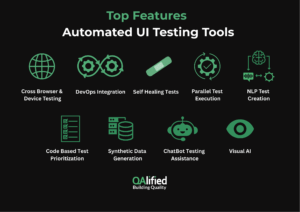
- Cross-browser and cross-device testing: Needs to support testing across different browsers, including Chrome, Firefox, Safari, Edge, and mobile devices running Android and iOS operating systems.
- CI/CD integration: Needs to integrate seamlessly with your DevOps pipeline through automatic test execution after each code commit or deployment.
- Self-healing tests: Provide the capability to perform automatic script updates when UI elements change, such as button ID or layout modifications, to minimize test maintenance work.
- Parallel test execution: Enables simultaneous test runs across multiple environments, which shortens testing duration for regression suites.
Modern AI-Enhanced Capabilities
- Natural language test creation: enable domain experts to create test steps through natural language, which will automatically generate automation scripts.
- Test prioritization based on code changes: AI algorithms evaluate recent code modifications to select the most important test cases, which will optimize time and resource utilization.
- Synthetic test data generation: Produce synthetic test data that follows privacy rules and duplicates actual user behavior patterns.
- Chatbot-based testing assistance: Provide non-technical users with the ability to interact with the UI automation tool via conversational interfaces like Slack or Microsoft Teams.
- Advanced Visual AI: Identify user interface problems that standard validation methods cannot detect, including element position errors and incorrect display output.
These integrated features enable automation to evolve from a basic operational task into a strategic business benefit.
Top Automated UI Testing Tools in 2025
The following section presents an overview of the top tools that drive automated UI testing in 2025. The tools present distinct advantages that match various team requirements and operational needs.
| Tool | Type / Specialty | Browsers / Platforms | Key Features | Target Audience / Use Cases |
| Playwright | Open-source, test automation | Chromium, Firefox, WebKit | High speed, reliable results, parallel execution, headless operations, JS and Python integration | Developers needing fast and reliable tests across multiple browsers |
| Katalon Studio | AI-driven, test orchestration | Web, mobile, APIs | AI-based automation, workflow management, unifies process automation and QA | Teams looking to consolidate automation and QA in a single workspace |
| Selenium | Open-source, automation framework | All major browsers | Large community support, requires frequent script updates | Organizations needing flexibility and strong community support |
| Cypress | Frontend testing | Chromium-based | Runs inside the browser, real-time debugging | Frontend developers working on modern web applications |
| AccelQ | Cloud-based, AI-powered automation | Web and APIs | Natural language test definitions, self-healing, test impact assessment, predictive test planning | Enterprises connecting manual testers with developers via automated testing |
| Opkey | Low-code, ERP and business app automation | Oracle, SAP, Salesforce, Workday | No-code test creation, autonomous test mining, business-process-centric modeling | Businesses needing to test ERP systems and enterprise applications |
| UiPath Test Suite | RPA + test automation | Web, desktop, APIs | RPA integration, full testing of applications and APIs | Organizations already using UiPath for business automation |
1. Playwright
Microsoft supports Playwright as an open-source tool that operates at high speed and delivers reliable results for Chromium, Firefox, and WebKit browsers. The tool enables users to run tests in parallel while performing headless operations, and it seamlessly integrates with JavaScript and Python development
2.Katalon Studio
Katalon Studio brings AI-driven automation and test orchestration into a single workspace, enabling teams to design, run, and manage workflows across web, mobile, and APIs with ease. It suits organizations looking to unify process automation and quality validation in a single, streamlined platform.
3. Selenium
Selenium maintains its position as a leading automation framework because it operates as an open-source system with extensive community backing. The tool operates across all major browsers, but users need to perform extensive script updates for maintenance.
4. Cypress
Cypress serves as a testing tool that developers of frontend code can use. The tool operates within browser environments to execute tests and provides users with real-time debugging capabilities. The tool operates exclusively with Chromium-based browsers to deliver an optimal testing experience for developers working on contemporary web applications.
5. AccelQ
The cloud-based automation platform AccelQ enables users to create tests through natural language definitions. The AI engine within AccelQ performs self-healing operations, conducts test impact assessments, and generates predictive test plans. The platform serves enterprise organizations that need to connect manual testing personnel with developers through automated testing solutions.
6. Opkey
Opkey provides users with an easy method to automate UI testing for their Oracle and SAP and Salesforce, and Workday applications. The platform allows users to create tests without code, while its autonomous test mining feature and business-process-centric test modeling capabilities are available. The platform serves businesses that need to test their ERP systems and business applications.
7. UiPath Test Suite
The UiPath Test Suite integrates RPA functionality with test automation capabilities through its part of the larger UiPath automation platform. The platform allows users to perform complete testing of web applications and desktop systems, and APIs through a single platform that supports business automation. Organizations that use UiPath automation tools should select this solution.
How to Choose the Right Automated UI Testing Software
The selection of UI testing tools requires organizations to choose tools that match their current development level and future objectives.
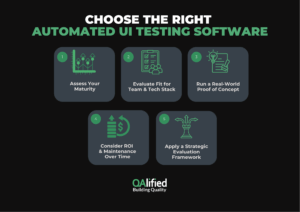
1. Assess Your Maturity
Your organization needs to establish its position on the automation maturity scale, which includes five levels of development.
1. The first level consists of basic automation with some basic scripting or record/playback.
2. The second level introduces reusable frameworks, components and codeless tools.
3. The third level of intelligent automation brings self-healing and prioritization capabilities.
4. At Level four, NLP, Visual AI, and test optimization techniques are put into action.
5. At Level Five, fully adaptive AI-driven testing tools are deployed, and they provide complete observability.
The level of organizational maturity determines which tools will generate the highest value and operational efficiency.
2. Evaluate Fit for Team and Tech Stack
The selection of tools depends on your team members’ technical abilities because Playwright works best for developers, yet AccelQ and Opkey operate better for users without programming skills.
The tool needs to work with your current technology infrastructure, which includes frameworks and browsers, and operating systems.
3. Run a Real-World Proof of Concept
Test critical workflows of your application with two or more tools before making any final decisions. The evaluation process includes aspects like:
- The duration needed to set up the tool.
- The simplicity of creating tests through the interface.
- The tool’s ability to handle changes in the user interface.
- The quality and usefulness of generated reports.
4. Consider ROI and Maintenance Over Time
The total cost of ownership includes more than just licensing expenses because you should also measure the value of AI-based features and monitor how they affect your cycle time and defect prevention. The evaluation of KPIs, including QA cost reduction and release velocity, helps organizations measure their progress.
5. Apply a Strategic Evaluation Framework
The evaluation process for enterprise-grade tools requires assessment across four essential dimensions, which include: –
- Capabilities: The tool needs to support all necessary test types.
- Ease of Adoption: The tool needs to provide simple adoption and usage for your team members.
- Life Cycle Integration: The tool needs to work seamlessly with your CI/CD and DevOps systems.
- Vendor Support: The vendor needs to maintain its position as your organization expands.
The methodical evaluation process converts automated UI testing tool selection from random choices into evidence-based decisions.
How QAlified Helps You Succeed with Automated UI Testing
The practice of automated UI testing has evolved into an essential requirement for modern software development. The practice of automated testing enables businesses to deliver software faster while producing higher quality applications that meet the evolving needs of their users.
The success of automation depends on selecting appropriate tools and frameworks and development strategies. The process of selecting appropriate tools requires professional expertise to achieve success.
QAlified provides specialized assistance to help clients: –
- Evaluate their current automation level to detect missing elements
- Perform customized tool assessments and proof-of-concept tests based on their specific technology environment
- Develop dependable test frameworks that integrate artificial intelligence to scale with business needs
- Establish performance indicators to track automation return on investment (ROI) and achieve maximum results
- Select automation solutions that match their business needs and goals
Learn more about our test automation services and how we help teams scale quality with confidence.
SHARE:

