


When you're making software, it's super important to check if it can handle lots of users at once. That's where k6 comes in. It's a tool that helps you test your app to make sure it's strong and fast enough for when lots of people use it.
Let's talk about what's great about k6, what could be better, and how it's different from other tools like JMeter.

What is k6 Used For?
k6 is used for conducting load and performance tests on web applications. It is useful for:
- Simulate concurrent user traffic.
- Identify bottlenecks and performance issues.
- Ensure the application can handle traffic spikes.
- Improve the scalability and stability of systems.
How Does k6 Work?
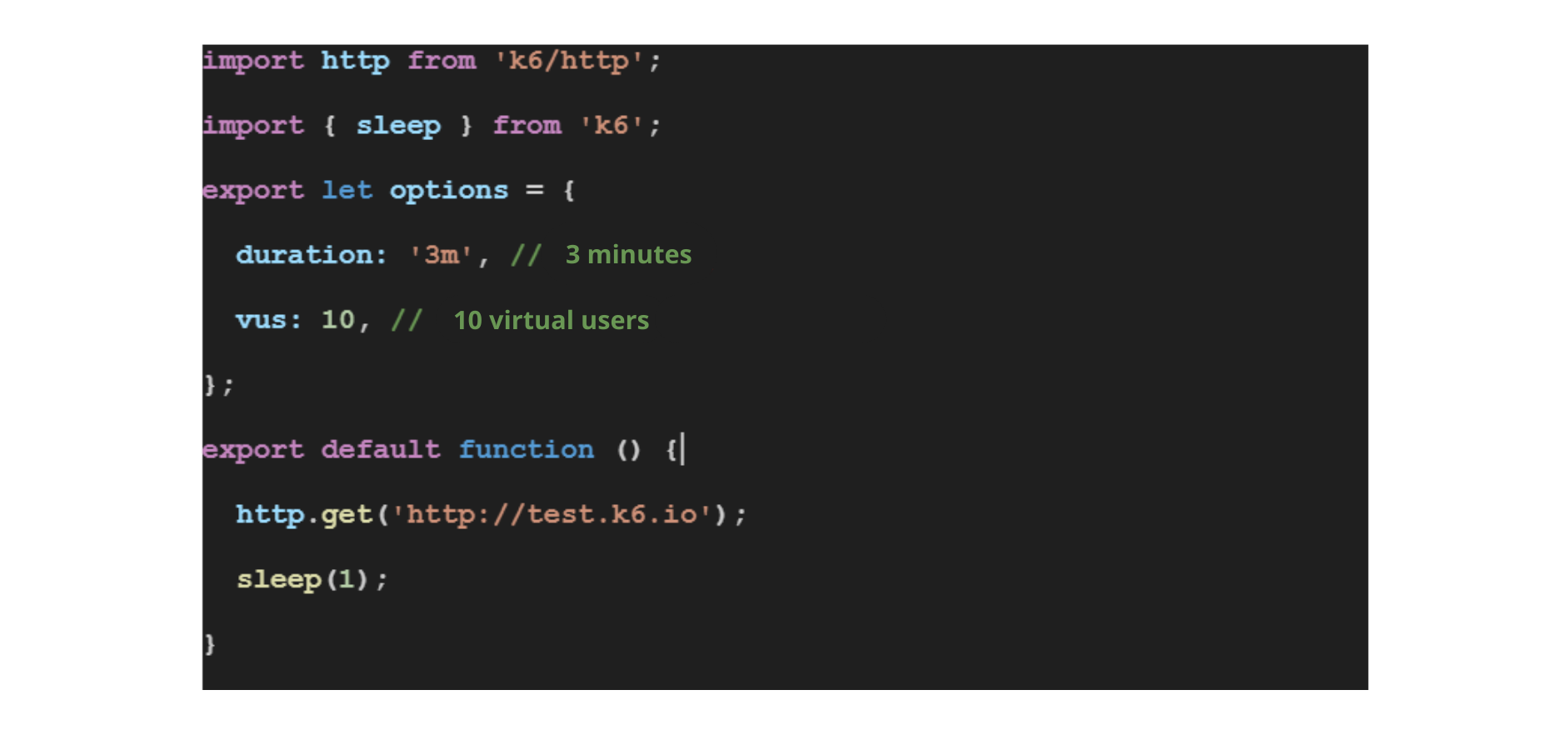
k6 operates by running scripts written in JavaScript that define the testing scenarios. These scripts specify the number of virtual users, the HTTP requests they should make, and any other logic necessary to simulate user behavior. k6 executes these scripts, collects performance metrics, and provides detailed reports on the results.
Advantages of k6
k6 has a number of compelling benefits that cater to modern development practices:
- Developer-Friendly: With test scripts written in JavaScript, developers can quickly write and maintain performance tests without needing to learn a new language.
- CI/CD Integration: k6 is designed to integrate with CI/CD pipelines, making continuous performance testing practical.
- Modern and Up-to-Date: k6 is made for today’s way of building apps, like when you use lots of small services that work together.
- Community and Support: As an open-source tool, k6 benefits from a community that contributes to its growth and offers support.
K6 basic code and use:
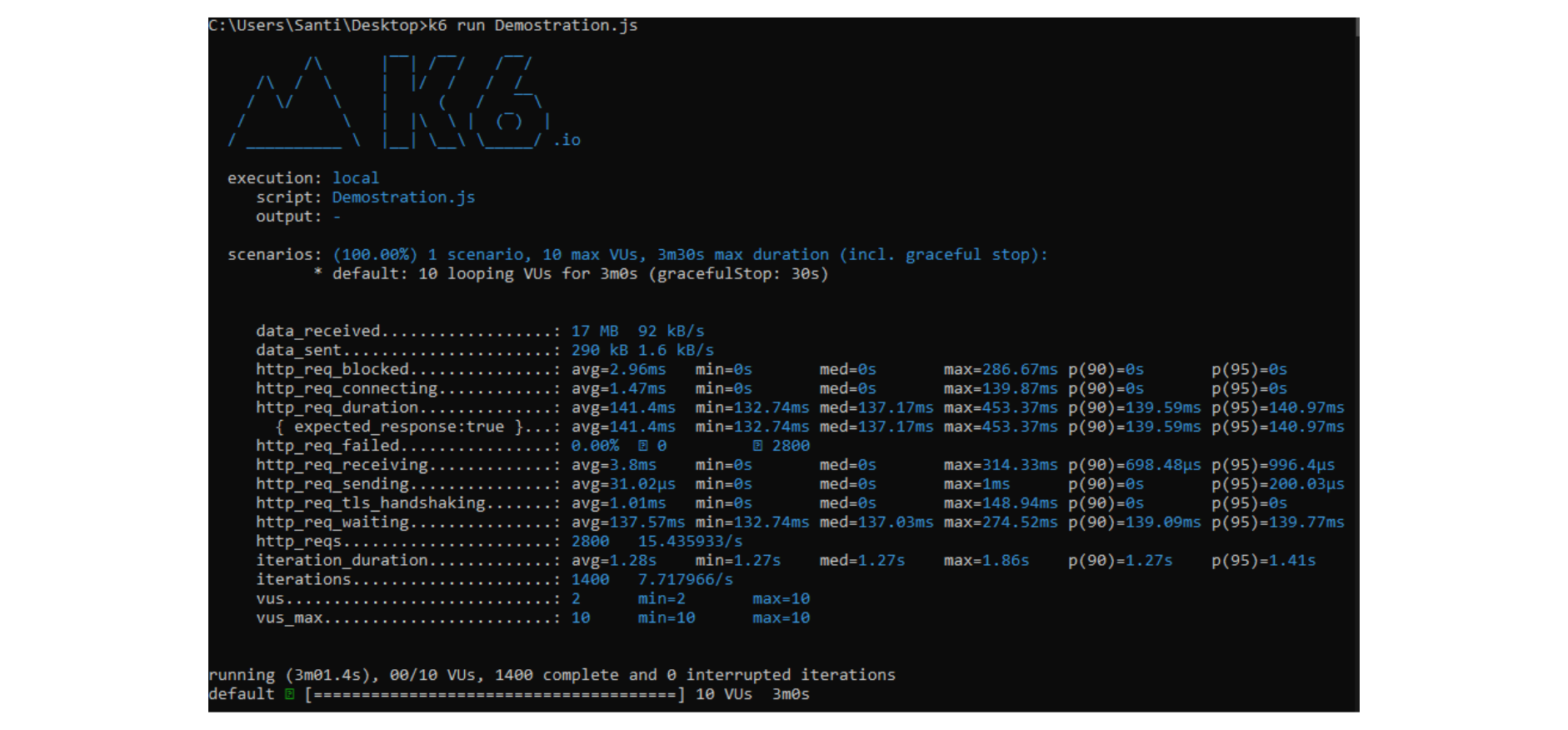
 Running command and metrics shown:
Storing k6 Metrics in InfluxDB and Visualizing with Grafana
To elevate performance monitoring, k6 can export the metrics collected during load tests to a time-series database like InfluxDB. This enables data persistence and facilitates long-term analysis. Furthermore, with the integration of Grafana, a platform for visualization and analytics, you can create interactive dashboards to visualize these metrics in real-time or historically, providing a deeper understanding of your application’s behavior under load.
Setting Up InfluxDB for k6
To get started, you need to have InfluxDB installed and running. k6 can send metrics directly to InfluxDB using the HTTP protocol. To configure k6 to send metrics to InfluxDB, you can use the –out output option on the command line:
k6 run –out influxdb=http://localhost:myk6port/myk6db script.js
Here, http://localhost:myk6port/myk6db is the URL where InfluxDB is listening, and myk6db is the database name that k6 will use to store the metrics.
Visualizing with Grafana
Once the metrics are in InfluxDB, you can use Grafana to create visualizations. Grafana offers a wide range of visualization options, such as line graphs, bar charts, and many others, allowing you to customize your dashboards to display the information that is most relevant to you and your team.
To visualize k6 metrics in Grafana, follow these steps:
1. Configure the Data Source: Add InfluxDB as a data source in Grafana, specifying the database URL, the database name (e.g., myk6db), and authentication details if necessary.
2. Create a Dashboard: Create a new dashboard and add panels.
3. Set Up Panels: In each panel, you can select the InfluxDB data source and build queries to visualize specific metrics, such as request rates, response times, and errors, among others.
4. Customize and Explore: Customize your charts with Grafana’s options to watch into your performance data. You can adjust the time period, add filters, and use various visualization features to make the data easier to understand.
By integrating k6 with InfluxDB and Grafana, you gain a powerful combination for performance testing: k6 generates the load and collects metrics, InfluxDB stores the time-series data, and Grafana presents it in an insightful and actionable way. This setup is ideal for teams looking to establish a robust performance monitoring solution that can scale with their needs.
Considerations When Using k6
While k6 is a robust tool, there are some considerations to keep in mind:
- Learning Curve: For teams not familiar with JavaScript or performance testing concepts, there may be an initial learning curve.
- Limited Protocol Support: k6 primarily focuses on HTTP/1.1, HTTP/2, and WebSocket protocols, which may not cover all testing scenarios.
- No GUI: k6 operates without a graphical user interface, which could be a barrier for those who prefer a more visual approach to test creation.
Interesting features of k6
k6 is not just another load testing tool; it brings unique features to the table:
- Scriptable Load Generation: Define custom load scenarios that mimic real user behavior, giving you control over your tests.
- Built-In Checkups: k6 can automatically tell you if something’s wrong with your app’s speed, so you don’t have to figure it out yourself.
- Test from Anywhere: You can run tests from your computer or use k6’s online service to test from all over the place, which is great for big tests.
k6 vs. JMeter: A Comparative Look
JMeter has been a referent in performance testing for years, known for its wide protocol support and graphical interface. Here’s a comparation of k6 and jmeter:
- Easy to Use: k6’s JavaScript-based scripting might be more approachable for developers familiar with the language, whereas JMeter’s GUI can be more intuitive for those who feel less comfortable with code.
- Performance: k6 is often known for its efficient use of system resources, which can be particularly beneficial when running large-scale tests.
- Extensibility: Both tools are extensible, but k6’s modern architecture might be more aligned with current development practices, especially in cloud-native environments.
- Integration: k6’s design for CI/CD integration is a significant advantage for teams practicing DevOps, whereas integrating JMeter into pipelines can be more complex.
Conclusion: k6 as a Performance Testing Tool
k6 represents a shift in performance testing, aligning with the needs of modern development teams. Its advantages in developer-friendliness, CI/CD integration, and cloud execution make it a strong contender in the load testing space. While it may have some drawbacks and differences compared to tools like JMeter, k6’s focus on simplicity and automation positions it as a go-to choice for teams looking to incorporate performance testing into their DevOps workflows.
Whether you’re building a new application or maintaining an existing one, k6 offers the tools and flexibility to ensure your software can handle the pressures of production.
SHARE:

